Email Templates
The reminder emails are Joomla mail templates. Open Email Templates in the User Reminder menu, or go to System > Mail Templates and filter by User Reminder.
The Three Templates
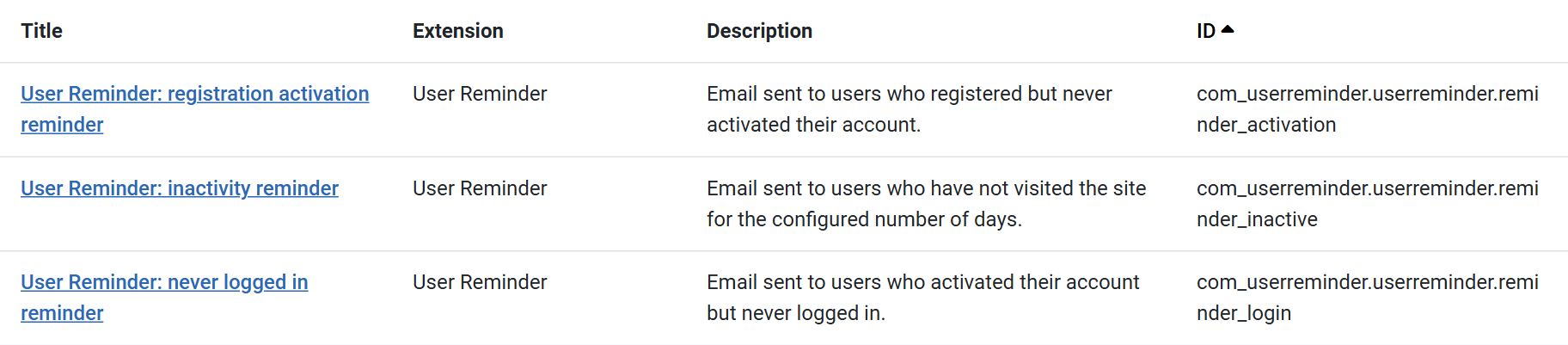
| Template | Sent to |
|---|---|
| User Reminder: registration activation reminder | Users who registered but never activated |
| User Reminder: never logged in reminder | Users who activated but never logged in |
| User Reminder: inactivity reminder | Users who haven't visited for the inactivity threshold |
Edit the subject, plain text body and HTML body. With several site languages, add a version per language.
Tags
| Tag | Replaced with |
|---|---|
{NAME} |
User's full name |
{USERNAME} |
User's username |
{SITENAME} |
Site name |
{SITELINK} |
Site URL |
{ACTIVATE_URL} |
Account activation link (activation reminder only) |
{PASSWORD_RESET_URL} |
Password reset link |
{OPTOUT_URL} |
Unsubscribe link |
Email Container
On the Email Container (HTML) tab of the options:
- Custom HTML container: wrap emails in the User Reminder design, or send the plain body
- Show logo and Logo file: a logo in the header instead of the site name
- Header title: leave empty to use the site name
- Footer text: text or HTML, with
{SITENAME},{SITELINK}and{YEAR} - Footer background color and Footer text color
Links
On the Links & URLs tab you can change the path of the activation link and the password reset link, for example for a custom registration component. Leave them empty for Joomla's defaults. With Community Builder, turn on Use Community Builder activation on the Reminders tab instead.
Links are built from your site URL. If the site runs on a local address, the dashboard warns you: set the correct site URL before going live.