Companies
Companies group the people you work with — your own organisation and your clients. Manage them from the Companies tab.
For Users
Browsing companies
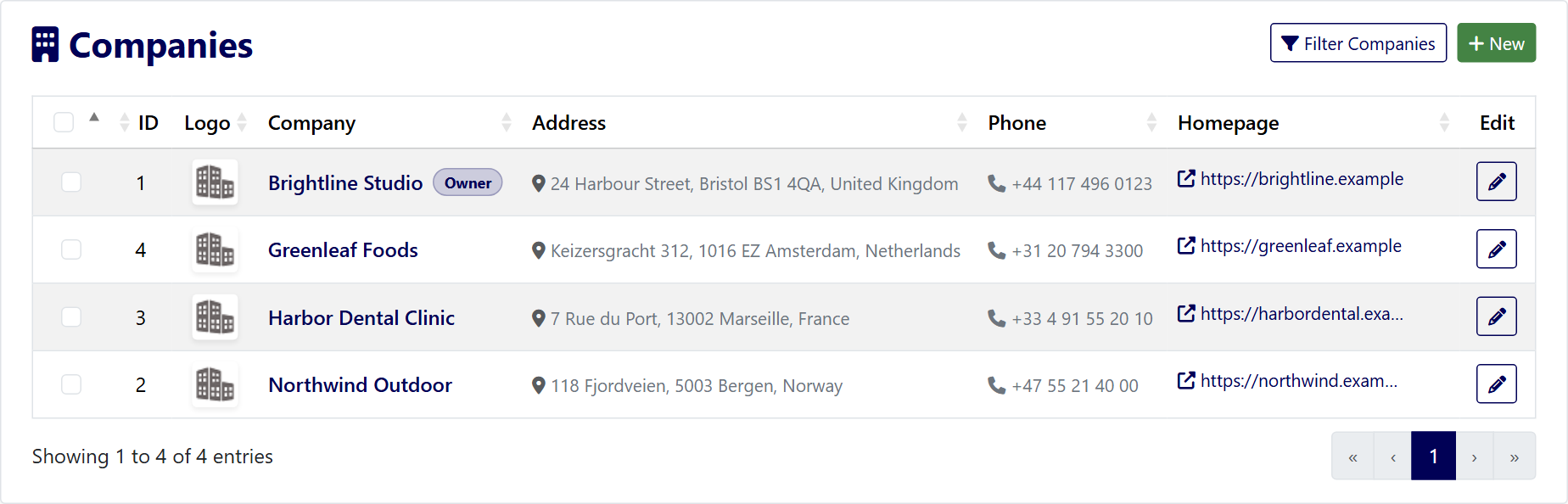
The company list shows every company you can access, with address, phone numbers, homepage, and an optional company image. Click a company name to open its overview. If your access role allows, you'll see New, Edit, and Delete buttons.
The company form
Create or edit a company's details, upload or remove a company image, and add or remove assignees. To upload an image, click Upload under the image, choose a file, and Save. If your access role allows assigning users, a Manage button beside Assignees opens the Assign Users modal.
The company overview
The overview shows all the company's details and the people in it (limited to those your access role permits). If you can create or delete companies, an Options drop-down reveals Edit Company, Delete Company, and — if you can create people — New User. Where your security level is higher than a person's, you can change their role from a drop-down.
For Admins
Owner company vs client companies
Your own organisation's details (used on quotes and invoices) are set under Settings → Company. Client companies are created here in the front-end.
Permissions
| Action | Governed by |
|---|---|
| View companies | Access role + company scope |
| Create / edit / delete companies | Access role with the matching capability |
| Assign users to a company | Access role with the assign capability |
Edge cases
- A person can be allowed to manage only their own company via a Company Only access role with Create level for companies.
- You only ever see the people in a company that your access role permits.
Field Reference
| Field | Description |
|---|---|
| Name | Company name. |
| Address 1–4 | Address lines. |
| Phone / Fax | Contact numbers. |
| Homepage | Company website. |
| Image | Company logo or picture. |
| Assignees | People/users assigned to the company. |
| Custom fields | Any custom fields added for companies. |