Dashboard
The dashboard is the first screen each user sees after logging in to JC Project. It surfaces the items most relevant to that person — upcoming and overdue work, unread messages, starred items, and recent team activity — aggregated from every project they belong to. Find it via the Dashboard tab in the front-end navigation.
For Users
Reading your dashboard
The dashboard is split into widgets, each summarising one type of item across all projects you are assigned to. You don't configure it — it builds itself from your assignments.
Upcoming Events
A seven-day strip showing the tasks, milestones, and events assigned to you for the week ahead. Hover any item for a tooltip with its project, due date, and summary, so you can see what needs attention at a glance.
Tasks & Milestones
- Upcoming Tasks / Milestones — items due soon on projects you're assigned to.
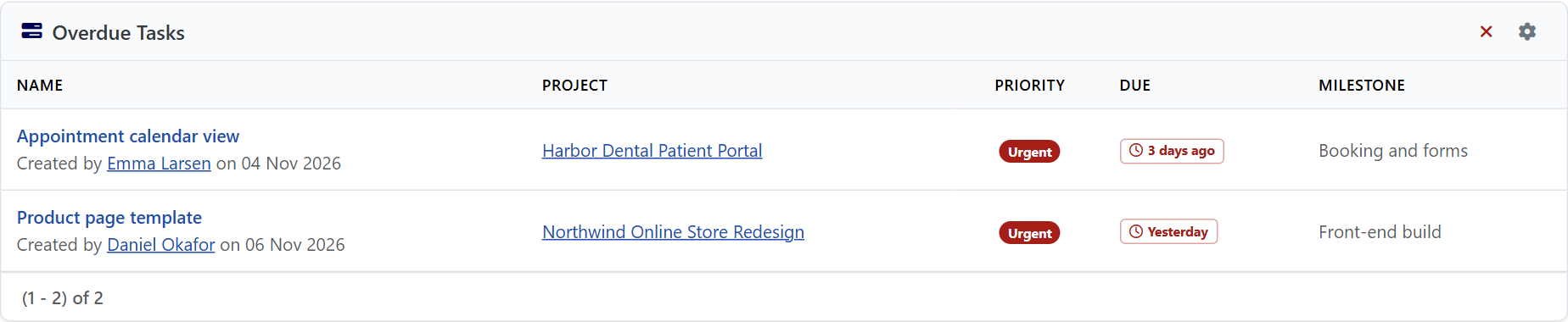
- Overdue Tasks / Milestones — items whose due date has passed and that are not yet complete.
Invoices
- Upcoming Invoices — invoices coming due, so you can plan ahead.
- Overdue Invoices — unpaid invoices past their due date.
Messages & Starred Items
- Unread Messages — your inbox; read the subject, see the sender, and jump straight to the message.
- Starred Items — anything you have flagged as important, kept one click away.
Activities since my last visit
A feed of everything your collaborators added, edited, or commented on since you last logged in — a fast way to catch up on every project you're part of.
For Admins
How the dashboard is populated
There is no separate dashboard setup. What each user sees is shaped by two things:
- Assignments — a user only sees items from projects and companies they are assigned to.
- Access role — visibility of private items and the invoice widgets depends on the user's access role (see Access Roles).
Permissions
| Action | Governed by |
|---|---|
| See a project's items on the dashboard | Assignment to the project + access-role security level |
| See the invoice widgets | Access role with invoice view permission |
| See private items | Access role with the "view private" capability |
Edge cases
- A brand-new user with no assignments sees an empty dashboard — assign them to a project or company first.
- "Activities since my last visit" resets on each login, so it always reflects what changed since you were last here.
Field Reference
The dashboard has no editable fields of its own; it aggregates Tasks, Milestones, Invoices, Events, Messages, and the activity log. See each feature's page for its fields.